SolSuite 2009's web site

SolSuite 2009's web site

SolSuite: A Great Way to Relax At Any Age


Support

Ribbon Interface

  1. What is the Ribbon?

  2. In which version of SolSuite has the Ribbon been implemented?

  3. Can I still use the old Menus and Toolbar (SolSuite 2008 interface) if I'm using SolSuite 2009?

  4. How can I switch from the old Menus and Toolbar (SolSuite 2008 interface) to the Ribbon (SolSuite 2009 interface)?

  5. How can I switch from the Ribbon (SolSuite 2009 interface) to the old Menus and Toolbar (SolSuite 2008 interface)?


  1. What is the Ribbon?
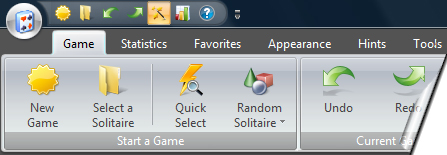
  2. SolSuite 2009 includes the Ribbon, a graphical user interface composed of a strip across the top of the main playing area. Ribbon interface is a part of the new Microsoft Fluent User Interface that replaces the menus and toolbars used since the 2008 version of SolSuite.

    The Ribbon is a way to enhance usability by consolidating related commands so that they are easier to find. Commands are organized into groups and related groups are organized on tabs. One need not look through multiple levels of hierarchical menus.

    SolSuite 2009 - New Ribbon interface
    New Ribbon interface


    Old Menus and Toolbar
    Old Menus and Toolbar
     

    Is this enough information?

    top of page


  1. In which version of SolSuite has the Ribbon been implemented?

SolSuite has implemented the new Ribbon interface with version 2009 (Version 9.0).

The 2008 version (Version 8.11 included) interface was based on Menus and Toolbars.

If you are using the 2008 Version or an older version, and you want to use the new Ribbon interface, you should upgrade to the 2009 Version of SolSuite.

The new Ribbon interface is available for Windows 7, Windows Vista and Windows XP operating systems. If you have a previous Windows version (Windows Me, 2000, 98, NT), you can continue to use SolSuite 2009 with the traditional Menus and Toolbar interface.

Is this enough information?

top of page


  1. Can I still use the old Menus and Toolbar (SolSuite 2008 interface) if I'm using SolSuite 2009?

Yes, you can still use the old Menus and Toolbars with SolSuite 2009.


Is this enough information?

top of page


  1. How can I switch from the old Menus and Toolbar (SolSuite 2008 interface) to the Ribbon (SolSuite 2009 interface)?

    You can switch at any time from the old Menus and Toolbars to the new Ribbon interface.

    To do this:
     

    1. From the Tools menu, click Options.
    2. In the "Ribbon or Toolbar" area, select "Ribbon"
    3. Click OK.
       
    Is this enough information?

    top of page


  1. How can I switch from the Ribbon (SolSuite 2009 interface) to the old Menus and Toolbar (SolSuite 2008 interface)?

    You can switch at any time from the Ribbon to the old Menus and Toolbars interface.

    To do this:

    1. From the Tools menu, click Options.
    2. In the "Ribbon or Toolbar" area, select "Old Menus and Toolbar".
    3. Click OK.

    Or:

    1. Click the Appearance tab.
    2. Select the "Switch to the old Toolbar" button.
       
    Is this enough information?

    top of page


Buy Now  -   Download Now  -  Features  -  Screenshots  -  Awards  -  Support/FAQs  -  Newsletter
SolSuite Champions  -  Manual  -  Contact Us  -  Spider Solitaire  -  Solitaires List  -  What's New

Copyright © 1998 - 2009 TreeCardGames.com and its licensors. - www.solsuite.com - All rights reserved.